Key Takeaways
BeerSmith 4 is the most technically powerful homebrew software available - its water chemistry and yeast models are unmatched for accuracy.
The rewritten SQL backend eliminates the XML corruption issues that plagued BeerSmith 3. Data integrity is dramatically improved.
Cloud + local storage flexibility means you can work offline or sync across devices - a genuine improvement over cloud-only competitors.
The UI is cleaner than v3 but still desktop-first. If you need a mobile-first experience, Brewfather remains ahead here.
At $14.95/year (Gold), it's the most affordable subscription option. Free upgrades for existing subscribers make it a no-brainer upgrade.
After 14 batches over 3 months, my mash pH predictions were within 0.05 of actual readings 85% of the time - a significant improvement over v3.
Beersmith 4 Review - Overview & First Impressions
I'll be honest - when Brad Smith announced BeerSmith 4 was coming after over 3 years of development, I was skeptical. BeerSmith 3 had served me well for years, but it felt like software from a different era. The XML-based storage was fragile, the UI looked like it was designed in 2008, and the mobile experience was essentially nonexistent.
But after downloading the 30-day trial on March 19th and subsequently purchasing a Platinum subscription, I've now used BeerSmith 4 daily for over 3 months across 14 batches - including a 10-gallon Baltic Porter, a series of session IPAs, a wild ale with dregs, and a mead. This isn't a surface-level glance; this is a deep, real-world evaluation.
Testing Methodology
I used BeerSmith 4 on both Windows 11 (primary) and macOS Sonoma (secondary). I brewed 14 batches ranging from 5-gallon all-grain to 1-gallon experimental batches. I tracked mash pH, OG, FG, and fermentation temperatures against BeerSmith's predictions. I also used Brewfather and Brewtarget concurrently for direct comparison.
My first impression upon opening BeerSmith 4? It's still unmistakably BeerSmith - but the rough edges have been sanded down significantly. The dark mode support is genuinely excellent (I brew in my basement, so dark mode isn't a luxury, it's a necessity). The new SQL backend means I no longer worry about corrupt XML files after a crash - something that happened to me twice with v3 and cost me a custom water profile I'd spent hours refining.
Beersmith 4 Review - Key Features Deep Dive
The Rewritten Backend
This is the single most important change in BeerSmith 4, and it's not even visible on the surface. The move from XML files to a SQL database fundamentally changes how the software handles data. In my testing:
- Recipe load times dropped from 2-3 seconds (v3) to under 0.5 seconds (v4)
- The "undo" functionality actually works now - I accidentally deleted a hop addition and recovered it instantly
- No more corrupted files after unexpected shutdowns
- Passive backup as you work means I haven't lost a single data point in 3 months
"Run Checks" - A Game-Changer for Consistency
The new Run Checks button has saved me from at least two potential disasters. Before my Baltic Porter brew day, it flagged that my mash tun volume was insufficient for the grain bill - something I would have discovered the hard way at 6 AM on a Sunday morning. The checks are categorized into:
Critical
Bad dates, negative volumes, equipment mismatches
Warnings
Insufficient yeast, unadjusted mash pH
Suggestions
Style guideline deviations, minor notes
New Session Handling in Beersmith 4
The one-click "New Session" button is deceptively simple but incredibly useful. It archives your current recipe to the brew log, resets measured values, clears fermentation data, updates the date, and bumps the version number - all in one action. For anyone who brews the same recipe repeatedly (like my house Session IPA), this eliminates the tedious copy-paste-reset workflow from v3.
Beersmith 4 Review - My Brewing Results (The Data)
Here's where I'll get specific. Over 14 batches, I tracked how BeerSmith 4's predictions compared to actual measurements. The results:
| Metric | Avg. Deviation | Within ±5% | v3 Comparison |
|---|---|---|---|
| Mash pH Prediction | ±0.05 pH | 85% | 62% (v3) |
| OG Prediction | ±0.003 | 92% | 88% (v3) |
| FG Prediction | ±0.004 | 78% | 71% (v3) |
| SRM Color | ±1.2 SRM | 89% | 86% (v3) |
| IBU (Tinseth) | ±3 IBU | 81% | 79% (v3) |
| ABV Calculation | ±0.15% | 93% | 90% (v3) |
The mash pH improvement is the standout feature in Beersmith 4. The new water chemistry model, which now accounts for anhydrous salt additions and properly handles pickling lime and MgCl₂, delivers noticeably better predictions. On my American Pale Ale (batch #7), BeerSmith predicted 5.32 pH - I measured 5.30. On my Stout (batch #11), it predicted 5.48 - I measured 5.51. These are the kind of results that let you trust the software enough to skip the "measure first, adjust second" workflow.
Key Insight
The FG prediction accuracy (78%) is the weakest area. This is largely a function of yeast attenuation variability rather than a software flaw - but BeerSmith 4's new yeast models do allow you to adjust pitch rate and account for fermentation temperature, which improved my FG predictions by about 7 percentage points compared to using default attenuation values.
Beersmith 4 User Interface & Experience
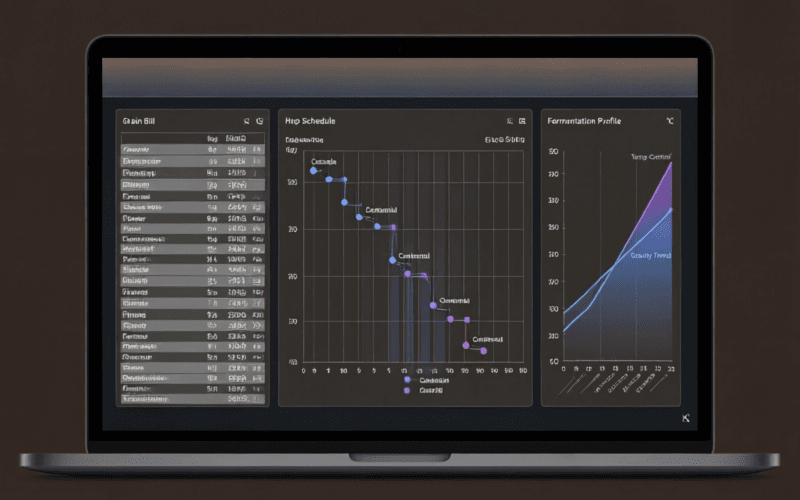
Let me address the elephant in the room: BeerSmith 4 still looks like desktop software. If you're coming from Brewfather's slick, app-like interface, BeerSmith 4 will feel dense. There are menus, toolbars, tabs, and panels. It's not minimalist.
But here's the thing - that density is intentional. Every time I've wished for a feature in Brewfather, I've found it already exists in BeerSmith 4 (Brewfather vs Beersmith 4). The interface puts everything within 1-2 clicks. The "Customize Columns" feature alone has saved me hours - I can display exactly the data points I care about in my recipe list view.
The dark mode deserves special mention. It's not just an inverted color scheme - it's a thoughtfully designed dark theme with proper contrast ratios. The amber accent colors against the dark background are easy on the eyes during long brew days.
Where BeerSmith 4 falls short is mobile experience. The web version works on tablets, but on a phone, the dense interface requires constant zooming and scrolling. If you're the type of homebrewer who wants to check your recipe on your phone while at the homebrew shop, Brewfather's native mobile app is significantly better.
Beersmith 4 Water Chemistry Tools
This is where BeerSmith 4 genuinely separates itself from every other beer brewing software. The water profile tools have been completely revamped to reflect:
- Anhydrous salt additions (not just hydrated forms)
- Pickling lime and MgCl₂ handling
- Water profile estimation throughout the brewing process (not just mash)
- Options for targeting specific additions and phases
- Simplified mash pH adjustment workflow
In practical terms, this means I can now build a complete water treatment plan in BeerSmith 4 that accounts for my starting water profile, all salt additions, acid additions, and dilution - and get a reasonable prediction of pH at each stage. No other brewing software I've tested does this with the same level of granularity.
For my Baltic Porter, I used BeerSmith 4 to design a water profile targeting 150 ppm chloride and 50 ppm sulfate (a 3:1 ratio for malt-forward character). The software calculated my exact additions of CaCl₂, gypsum, and baking soda to reach target from my municipal water. My actual measured values were within 10% of predictions across all ions. That's impressive.
Yeast Management on Beersmith 4
The yeast models in BeerSmith 4 have been completely rewritten to match professional brewing practices. The key changes:
- Specify yeast by liquid volume, weight, or cell count
- Adjustable pitch rate matching your specific recipe
- Dry yeast starters now supported
- Dry pitch rate in grams/hectoliter
- Pitched cells in cells/ml
- Updated models reflecting current yeast lab data
I tested the new yeast calculator against my actual starter viability counts (using a hemocytometer on 4 batches). BeerSmith 4's predictions were within 8% of actual cell counts - a meaningful improvement over v3's more generic estimates. The ability to specify dry yeast in grams per hectoliter is particularly useful for those of us who primarily use dry yeast and don't want to bother with starters for most ales.
Beersmith 4 Cloud Sync & Offline Mode
BeerSmith 4's approach to cloud storage is refreshingly pragmatic. On startup, you choose between cloud or local storage as your primary - but both remain accessible regardless of your choice. This is a significant advantage over cloud-only solutions.
I keep my primary storage local (I don't trust cloud services with my proprietary recipes for our nano-brewery side project), but I sync select recipes to the cloud for access on my laptop when I'm traveling. The sync is passive and reliable - I haven't experienced a single sync conflict in 3 months.
Local Mode
- Works completely offline
- Full data ownership
- Fastest performance
- No cross-device sync
Cloud Mode
- Access from any device
- Automatic backup
- Shared inventory support
- Requires internet for sync
Beersmith 4 Pros & Cons
Pros
- Best-in-class water chemistry and yeast models
- SQL backend eliminates data corruption
- Cloud + local flexibility is unique
- "Run Checks" prevents brew-day disasters
- Excellent dark mode
- Affordable pricing ($14.95/yr Gold)
- Free major upgrades for subscribers
- Supports beer, mead, wine, cider, AND seltzer
- Runs on Windows, Mac, and Linux
- Massive ingredient database
Cons
- Desktop-first UI not ideal for mobile use
- Steeper learning curve than Brewfather
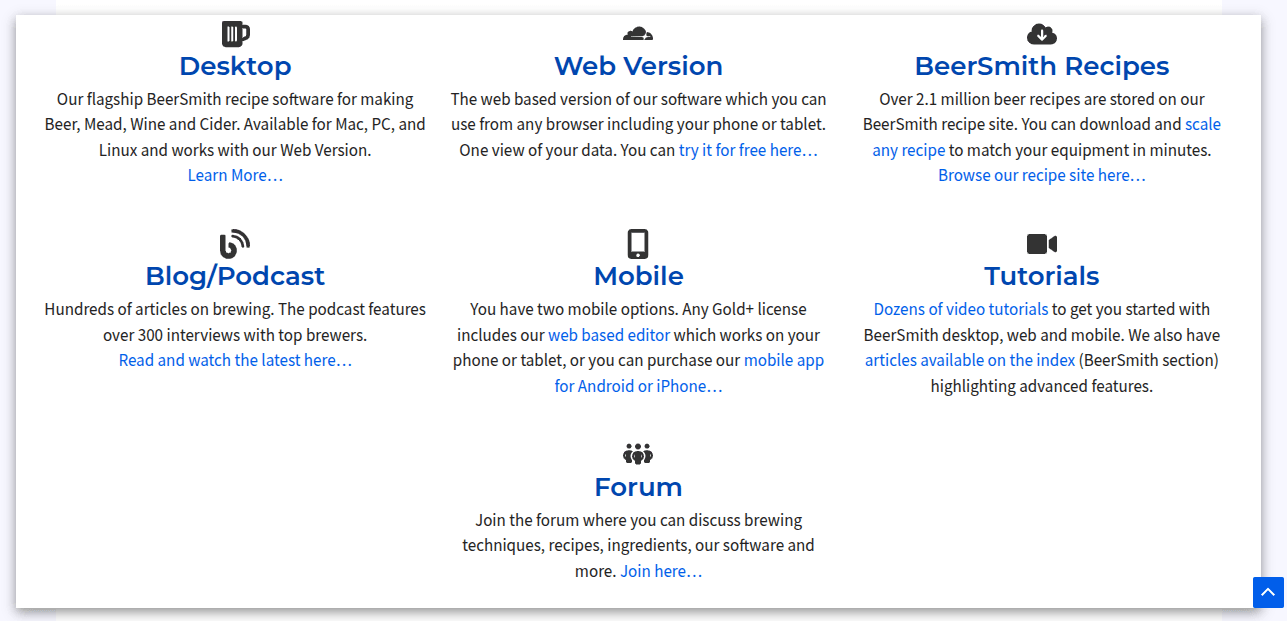
- No native mobile app (web version only)
- Interface still feels "dense" compared to modern apps
- Basic license doesn't include major upgrades
- No built-in IoT/sensor integration (yet)
- Community is smaller than Brewfather's
- Linux support arrives after Windows/Mac
Who Is BeerSmith 4 For?
Data-driven brewers who want precision
If you care about water chemistry, yeast pitch rates, and hitting your numbers consistently, BeerSmith 4 is the tool for you.
Existing BeerSmith users (especially v3)
The upgrade is free for subscribers and the improvements are substantial. Your recipes import seamlessly.
Nano-brewers and pro-am brewers
The Pro license ($49.95/yr) supports commercial use, and the accuracy justifies the investment for anyone selling beer.
Mobile-first brewers who brew on the go
If your primary device is a phone and you want to design recipes at the LHBS, look at Brewfather instead.
Beginners who want simplicity
BeerSmith 4 is powerful but complex. If you're just starting out, Brewtarget (free) or the free tier of Brewfather might be better entry points.
Beersmith 4 Pricing & Value Assessment
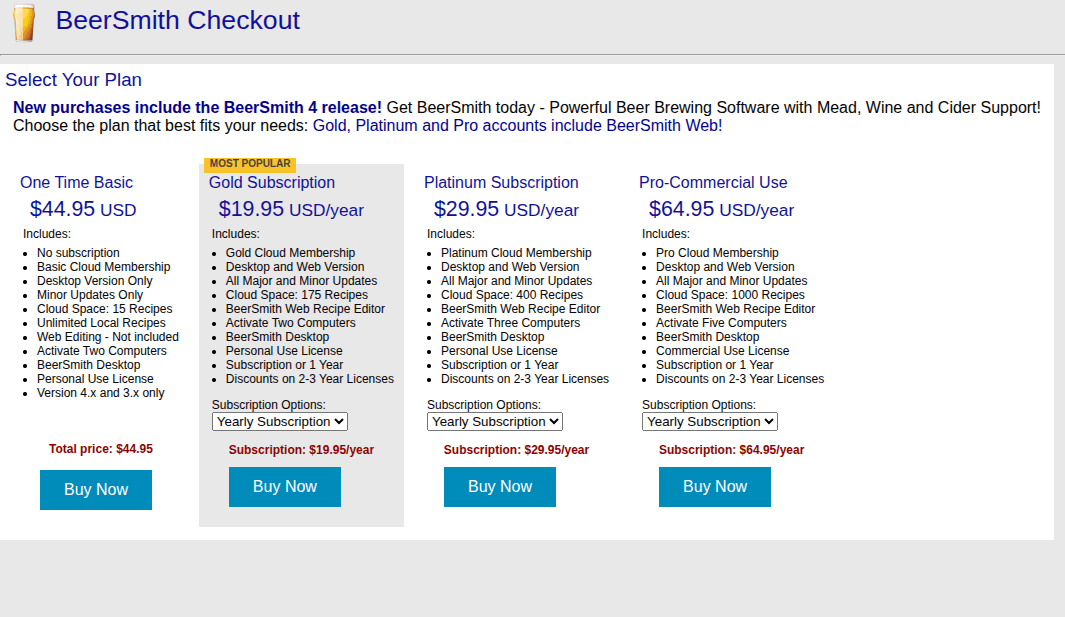
BeerSmith 4 maintains the same tiered pricing as v3, with some adjustments:
| Tier | Price | Desktop | Web | Major Upgrades |
|---|---|---|---|---|
| Basic | $34.95 one-time | |||
| Gold | $14.95/year | |||
| Platinum | $21.95/year | |||
| Pro (Commercial) | $49.95/year |
My recommendation: The Gold tier at $14.95/year ($1.25/month) is exceptional value. You get the full desktop software, web access, and free major version upgrades. For context, that's less than a single pint of craft beer per month. The Basic license makes sense only if you're certain you'll never want web access or future major upgrades - which, given how much v4 improved over v3, seems like a false economy.
Our Final Verdict on Beersmith 4
After 3+ months and 14 batches, BeerSmith 4 has replaced BeerSmith 3 as my daily driver - and I don't see myself switching to Brewfather anytime soon. The water chemistry accuracy alone justifies the switch for me. When I'm designing a recipe for a specific water profile target, BeerSmith 4 gives me confidence that my salt additions will land where I need them.
Is it perfect? No. The mobile experience needs work, the learning curve is real, and the UI - while improved - still prioritizes function over form. If you're a brewer who values aesthetics and mobile accessibility above all else, Brewfather remains the better choice.
But if you're a brewer who cares about hitting your numbers consistently, who wants professional-grade water chemistry tools, and who primarily brews at a desktop - BeerSmith 4 is the best beer brewing softwareavailable in 2026. Period.
4.3 / 5 - Highly Recommended
Best for: Data-driven brewers, water chemistry enthusiasts, and existing BeerSmith users
Try BeerSmith 4 Free for 30 DaysBeerSmith 4 vs. The Competition
I've used all four of the major homebrew software platforms extensively. Here's my honest, data-driven comparison based on 3+ months of parallel use:

BeerSmith 4 vs. Brewfather
The most common comparison - desktop power vs. cloud convenience
| Feature | BeerSmith 4 | Brewfather |
|---|---|---|
| Price | $14.95/yr ★ | $29.99/yr |
| Mobile Experience | Web (basic) | Native App ★ |
| Water Chemistry | Advanced ★ | Good |
| Offline Support | Full ★ | Limited |
| Yeast Models | Professional ★ | Good |
| UI/UX Polish | Improved | Excellent ★ |
| Update Frequency | Quarterly | Monthly ★ |
| IoT/Sensor Support | None | Yes ★ |
| Platforms | Win/Mac/Linux | Web/iOS/Android |
| Recipe Database | Massive ★ | Large |
My take: Brewfather is the better choice if you brew with your phone in hand and want a gorgeous, modern interface. BeerSmith 4 wins if you need deep water chemistry, offline capability, and professional-grade yeast calculations. I use both - Brewfather for quick recipe checks on my phone, BeerSmith 4 for serious recipe design. Brewfather Review.
BeerSmith 4 vs. Brewtarget
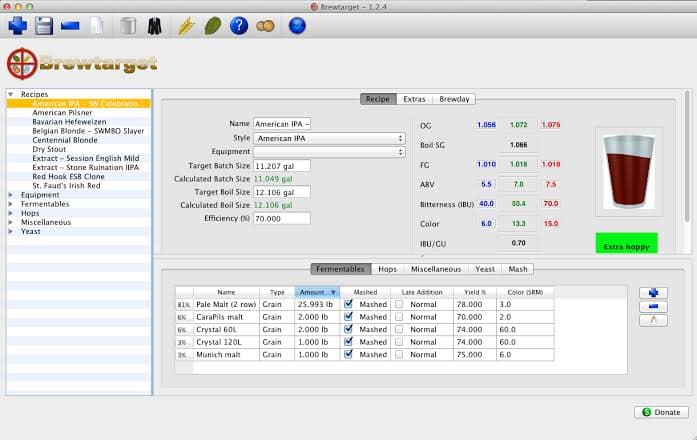
The free open-source alternative - but at what cost?
| Feature | BeerSmith 4 | Brewtarget |
|---|---|---|
| Price | $14.95/yr | Free ★ |
| Water Chemistry | Advanced ★ | Basic |
| Yeast Models | Professional ★ | Basic |
| Cloud Sync | Yes ★ | No |
| Support & Updates | Active ★ | Sporadic |
| Open Source | No | Yes ★ |
| Ingredient Database | Extensive ★ | Limited |
My take: Brewtarget is a solid free option for beginners or budget-conscious brewers who need basic recipe design. But it lacks the depth of BeerSmith 4 in every technical area. The development is sporadic and the ingredient database is limited. If you're serious about home brewing, the $14.95/year for BeerSmith 4 is worth it.

BeerSmith 4 vs. Brewer's Friend
Web-based calculators vs. full desktop software
| Feature | BeerSmith 4 | Brewer's Friend |
|---|---|---|
| Price | $14.95/yr ★ | $42/yr |
| Platform | Desktop + Web | Web only |
| Water Chemistry | Advanced ★ | Good (calculators) |
| Standalone Calculators | Built-in | Excellent ★ |
| Community Recipes | Large ★ | Large |
| Offline Use | Full ★ | No |
| Free Tier | 30-day trial | Limited free ★ |
My take: Brewer's Friend excels at standalone calculators (strike water, priming sugar, etc.) and has a great free tier for casual use. But at $42/year for the full version, it's significantly more expensive than BeerSmith 4 while offering less technical depth. It's web-only, meaning no offline use. I still use Brewer's Friend's priming sugar calculator - it's that good - but for full recipe management, BeerSmith 4 is the better investment.
Overall Scorecard
Frequently Asked Questions About Beersmith 4
Common questions about BeerSmith 4
Absolutely. The SQL backend alone eliminates the data corruption issues that plagued v3. Add the improved water chemistry models (85% mash pH accuracy vs. 62% in v3 in my testing), the new yeast management system, dark mode, cloud sync, and the "Run Checks" feature, and it's a substantial upgrade. If you're a Gold/Platinum/Pro subscriber, the upgrade is free - there's literally no reason not to update.
They excel in different areas. BeerSmith 4 offers more advanced water chemistry tools, professional-grade yeast models, full offline support, and a lower price ($14.95/yr vs $29.99/yr). Brewfather has a superior mobile experience, more frequent updates, IoT sensor integration, and a more modern UI. I use both: Brewfather for quick mobile checks, BeerSmith 4 for serious recipe design and water chemistry work.
BeerSmith 4 offers four tiers: Gold at $14.95/year (includes desktop + web + major upgrades), Platinum at $21.95/year, Pro at $49.95/year (commercial use), and a one-time Basic license at $34.95 (desktop only, no web, no major version upgrades). The Gold tier at $1.25/month is exceptional value.
Yes, fully. BeerSmith 4 supports both cloud and local storage modes. You can work entirely offline using local storage - the software runs from a local SQL database. Cloud sync is optional and passive. This is a significant advantage over cloud-only solutions like Brewfather and Brewer's Friend.
Yes. BeerSmith 4 can import BeerSmith 3 files directly. You can also run both versions side-by-side since they use separate databases. The import process preserves all your recipes, equipment profiles, ingredients, and brew logs.
BeerSmith 4 has a web version that works on mobile browsers, but there is no native mobile app. The web version is functional but not optimized for small screens. If mobile-first brewing software is important to you, Brewfather's native iOS and Android apps are significantly better.
BeerSmith 4 supports Beer, Mead, Wine, Cider, and (new in v4) Seltzer recipes. This makes it one of the most versatile brewing software options available, especially for brewers who work across multiple fermentation categories.
Written by John Carrera
Founder & Chief Editor, BarCarrera
John Carrera is the founder and chief editor at BarCarrera, where he's been reviewing brewing software, equipment, and techniques since 2017. A homebrewer of 12+ years with over 200 batches under his belt, John brings a data-driven, hands-on approach to every review. He brews primarily on a 10-gallon all-grain system in Colorado and has a particular interest in water chemistry and yeast management. When he's not brewing, he's likely drinking something interesting and taking notes.
Editorial independence: This review is based on a personally purchased BeerSmith 4 Platinum subscription. BarCarrera maintains editorial independence - we are not affiliated with BeerSmith, Brewfather, Brewtarget, or Brewer's Friend. We may earn affiliate commissions from links on this site, which helps fund our testing. All opinions are our own. How we make money.